Semantic search using Open AI Embedding, Pinecone Vector DB, and Node JS

For the previous article, we use Postgres with pgvector extension to store the vector data of our article. Today let's try to change the Postgres with Pinecone Vector DB.
Previous Article:
https://dev.fandyaditya.com/semantic-search-using-openai-embedding-and-postgres-vector-db-in-nodejs
Why Pinecone?
Many people across the internet mention pinecone are good for semantic search, because that is what pinecone is intended to build. After I do quick research (research for the pricing, obviously :D), for today 23 march 2023 pinecone already has NodeJs client, also I think it is affordable and has a generous free tier. So why not?
Prerequisite
For this topic, we will use 90% of code from the previous trial. Here are some additional work we need to do:
Database
As we know, today we will use Pinecone. Create an account at pinecone.io first.
And then at the console, create an Index. Index is like a table in a relational DB.
Index Name: whateveruwant (i named it"article")
Dimensions: 1536
Metric: cosine
Pod Type: S1/P1
We need to specify the Dimensions to 1536 because the model text-embedding-ada-002 we used from OpenAI to create embedding returned 1536 vector dimension.
Library
We need the Pinecone NodeJs library:
"@pinecone-database/pinecone"
npm install @pinecone-database/pinecone
ENV
We need the Pinecone API key and env
PINECONE_API_KEY
PINECONE_ENV
Get them in the Pinecone console, after creating Index.
Code
Our Project structure, with the previous code, will look like this:
node_modules
.env
article.txt
embed.js
openAi.js
package.json
server.js
supabase.js
pinecone.js(new)
Init pinecone, and create upsert function. Based on this documentation
//pinecone.js

//init
const { PineconeClient } = require("@pinecone-database/pinecone");
const uuid = require('uuid').v4;

const pinecone = new PineconeClient();

pinecone.init({
  environment: process.env.PINECONE_ENV,
  apiKey: process.env.PINECONE_API_KEY,
});

//upsert function
const upsert = async (data) => {
    const index = pinecone.Index('article');
    const { content, content_tokens, embedding } = data;

    const upsertRequest = {
        vectors: [
            {
                id: uuid(),
                values: embedding,
                metadata: {
                    content,
                    content_tokens
                }
            }
        ]
    }
    try {
        const upsertResponse = await index.upsert({ upsertRequest });
        return upsertResponse;
    }catch(err) {
        return err
    }

};

module.exports = {
    upsert,
}
From upsertRequest, use metadata to store value others than the embedding to the database. From this project, we store content and content_tokens
Now, to the embed.js call it.
//embed.js
const pineConeHelper = require('./pinecone');
....
(async () => {
    const article = await fs.readFileSync('article.txt', { encoding: 'utf8' });
    const chunkedArticles = await chunkArticle(article);

    for(let i = 0 ; i < chunkedArticles.length ; i++) {
        const embedding = await openAiHelper.createEmbedding(chunkedArticles[i].content);
        await pineConeHelper.upsert({
            content: chunkedArticles[i].content,
            content_tokens: chunkedArticles[i].content_tokens,
            embedding
        });

        //temporary disabling supabase from prev trial

        // const { data,error } = await supabaseHelper
        //     .from('semantic_search_poc')
        //     .insert({
        //         content: chunkedArticles[i].content,
        //         content_tokens: chunkedArticles[i].content_tokens,
        //         embedding
        // })

        setTimeout(() => {}, 500)
    }
})()
Run:
node embed.js
If this success, go to the Pinecone console, and you will see in the Index info, there will be data stored.
Now for the query, create a query function.
//pinecone.js
...

const query = async (embed) => {
    const index = pinecone.Index('article');
    const queryRequest = {
        vector: embed,
        topK: 10,
        includeValues: false,
        includeMetadata: true
    }
    try {
        const response = await index.query({ queryRequest })
        return { data: response }
    }catch(err) {
        return { error: err }
    }

}

module.exports = {
    upsert,
    query
}
The vector field will search the embedding with the top 10 values. We don't want to include the vector values and want the metadata only, so we set includeMetadata=true
Now call it on server.js
const pineconeHelper = require('./pinecone');
...
app.get('/', async (req, res) => {
    const { q } = req.query;

    const embedding = await openAiHelper.createEmbedding(q);

    //temporary disabling supabase from prev trial

    // const { data, error } = await supabaseHelper.rpc('semantic_search', {
    //     query_embedding: embedding,
    //     similiarity_threshold: 0.5,
    //     match_count: 5
    // })

    const { data, error } = await pineconeHelper.query(embedding);

    if(error) {
        res.status(404).send({ message: `${q} doesn't match any search` });
    } else {
        res.status(200).send({...data})
    }
})
Run the server, and try to hit http://localhost:9000/q=ask something
node server.js
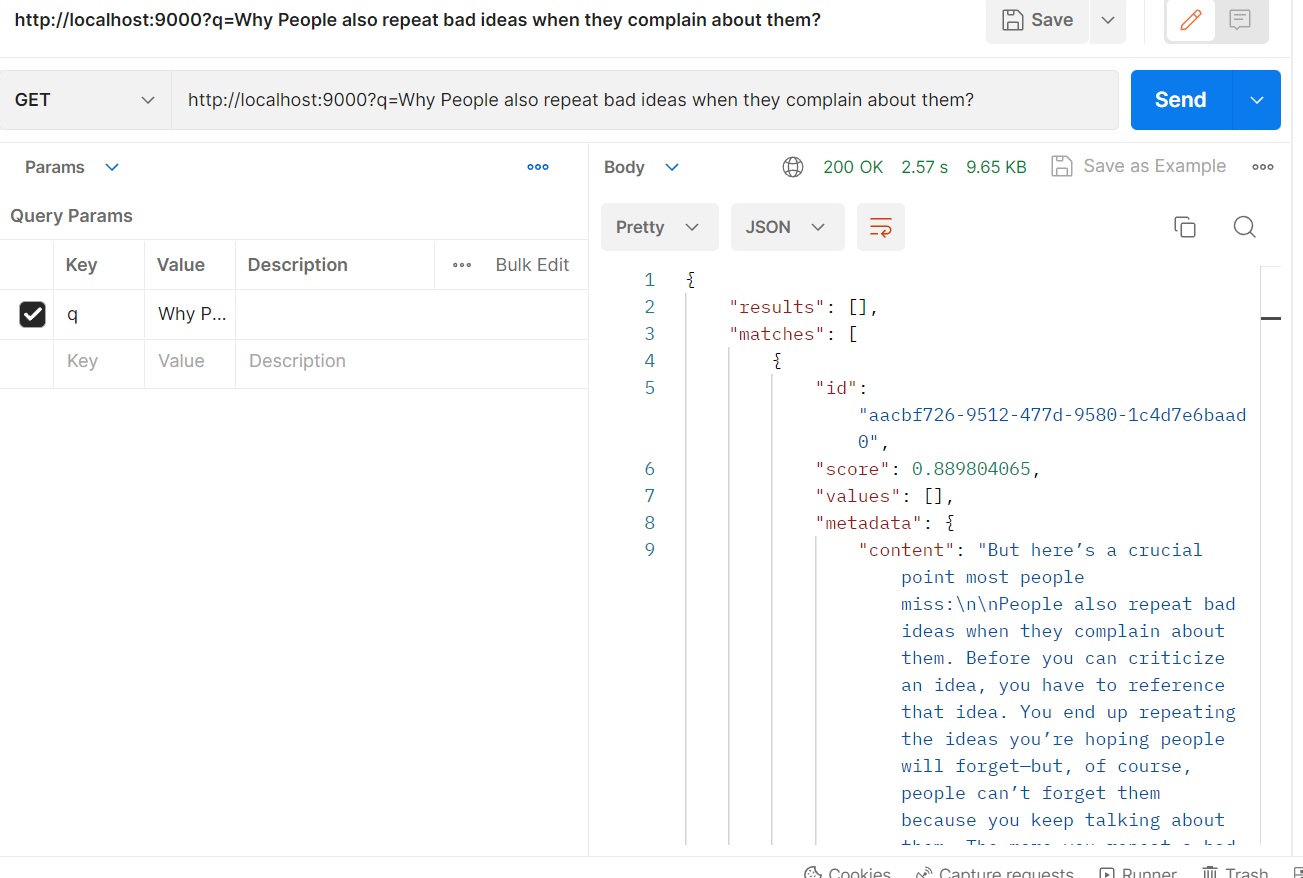
It running smoothly!
Resources
GitHub for this project (branch "pinecone"): https://github.com/fandyaditya/semantic-search-poc/tree/pinecone
About the author
I am always eager to experiment with new technology and share my experiences and insights gained through trial and error. Currently working as Backend Engineer.
Comments
Join the discussionNo comments yet. Be the first to comment.
Open AI & Semantic Search
In this series, I will share what I explore with the new AI Wave: Open AI API and use it to build the semantic search of articles, podcasts, youtube video